4. Jetson Nano Development Tutorial

4.1 Getting Started
4.1.1 Wiring Instruction
This section uses DuPont wires to connect digital tube module. For wiring instructions, refer to the figure below:
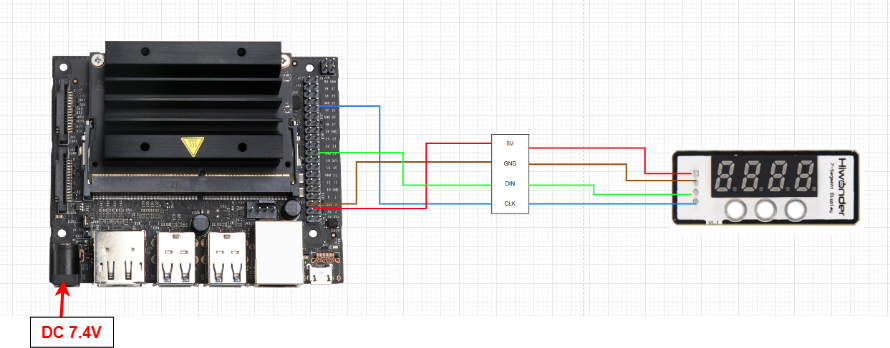
Note
Note: Before powering on, ensure that no metal objects are touching the controller. Otherwise, the exposed pins at the bottom of the board may cause a short circuit and damage the controller.
4.1.2 Environment Configuration
Install NoMachine on your computer. The software package is located under “2 Software Tools & Programs -> 01 Software Installation Package -> Remote Desktop Connection Tool -> 1 Remote Desktop Connection Tool”. For detailed usage of NoMachine, refer to the materials in the same directory.
Drag the program into the Jetson Nano system image. As an example, place it on the desktop. Ensure that both “digital_display.py” and “tm1640.py” are stored in the same directory.
4.2 Test Case
In this case, the digital tube is controlled by the program to display the specified information.
4.2.1 Program Execution
Open the terminal and enter the following command to navigate to the program directory:
cd Desktop/
Run the program by entering:
Python3 digital_display.py
4.2.2 Project Outcome
After executing the program, the digital tube module will display the number “1234”.
4.2.3 Program Brief Analysis
Import Libraries
from tm1640 import TM1640
import time
Import the library files required by the program, including the library files needed for delay and the library files for using GPIO pins on the Jetson controller.
Initialization Operation
# Character pattern data (字模数据)
font = {'0':0x3f,'1':0x06,'2':0x5b,'3':0x4f,'4':0x66,'5':0x6d,'6':0x7d,'7':0x07,'8':0x7f,'9':0x6f, '-': 0x40}
Define the dictionary “font”, which contains the segment codes for digits 0–9 and the symbol “–” on the digital tube module.
Main Function
def main():
    mtx = TM1640(6, 10) #6, 10 correspond to CLK and DIO pin numbers (6, 10 对应 CLK,DIO 引脚号)
    mtx.gram = (0x06,0x5b,0x4f,0x66)  # gram serves as display memory for the LED matrix, each byte represents one digit (gram用作点阵的显存,共4个字节,一个字节对应一位数字)
    mtx.refresh()
    time.sleep(1)

if __name__ == '__main__':
    main()
Initialize the pins 6 and 10 of GPIO, and then set the value displayed by the digital tube through the dictionary defined by the signature, that is: 1234;
Then use the mtx.refresh () function to control the digital tube to refresh. The time.sleep sets the duration to 1 second, meaning the digital tube refreshes every 1 second.