1. OLED Display Module Manual
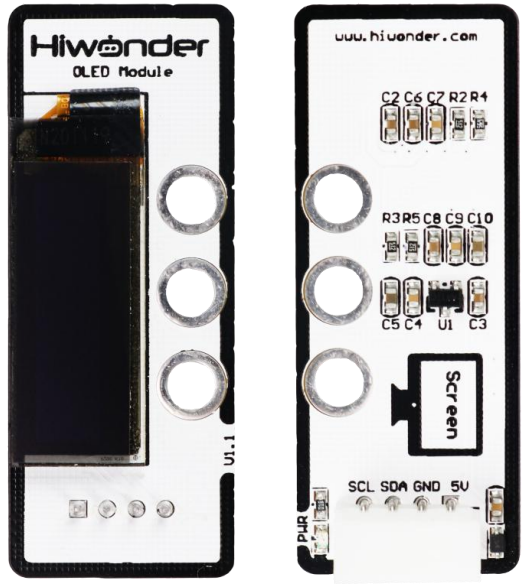
1.1 OLED Module Description
1.1.1 Sensor Introduction
The OLED Display Module primarily uses a 0.91-inch blue OLED screen, featuring a wide viewing angle, fast response, stable graphics, high brightness, and high resolution. The SSD1306 driver chip is used, enabling you to control the OLED and display the desired content.
1.1.2 Working Principle
The OLED module emits light using organic luminescent materials under an electric current, thereby forming images.
Specifically, an OLED module consists of organic luminescent materials, metal electrodes, and a transparent conductive layer. When driven by voltage, current is injected from the metal electrodes into the organic luminescent materials, exciting the organic molecules to generate photons and release energy, producing visible light.
The working principle of an OLED module is similar to that of an LED, but OLEDs use organic materials as the emissive layer, offering higher brightness and greater contrast.
It also offers self-emission, wide viewing angles, fast response, and flexibility, making it suitable for various display and lighting applications.
1.2 Notice
Avoid prolonged display of static images: Continuously displaying static images may cause certain pixels to darken. It is recommended to minimize the display of static content on the OLED module.
Avoid excessive brightness: High brightness levels can shorten the lifespan of the OLED module. Try to use moderate brightness and avoid full-brightness display for extended periods.
Handle with care: The surface of the OLED module is relatively fragile and easily scratched, so you need to avoid collisions during use and provide appropriate protection.
Minimize fixed-screen display: When programming, avoid or reduce static screens. Dynamic display methods, such as vertical or horizontal scrolling, are preferred.
Proper cleaning: To clean the OLED surface, gently wipe with a soft cloth moistened with a solvent such as isopropyl alcohol or ethanol. Avoid using dry or hard materials, which can easily damage the screen.
Avoid physical stress: Do not subject the OLED module to severe vibration, impact, compression, or drops, as these may cause damage.
Avoid operating on circuit-printed surfaces: Working on such surfaces may damage the OLED module.
1.3 Specifications
For more information of this chip, you may refer to “OLED sensor schematic”
1.3.1 Pin Instruction
| Pin | Instruction |
|---|---|
| 5V | Power Input |
| GND | Ground |
| SDA | SDA Data Cable |
| SCL | SCL Clock Line |
1.3.2 Specifications
| OLED Module | |
| Parameter | Specification |
| Power Supply | DC 5V |
| Communication | IIC |
| Number of Pins | 4 |
| Indicator Light (PWR) Description | The PWR LED lights up when powered. |
| Product Dimensions | 50mmx20mm |
| 0.91-inch Blue OLED Display Specifications | Resolution: 128 × 32 pixels |
| Overall Dimensions: 30.0 × 11.5 × 1.45 mm | |
| Active Display Area : 22.384 × 5.584 mm | |
| Pixel Pitch: 0.175 × 0.175 mm | |
| Pixel Size: 0.159 × 0.159 mm | |
| Driver IC: SSD1306; Module Structure: COG | |
| Modular installation, compatible with Lego series. | |
1.4 Project Outcome
You can refer to the example tutorials and programs for each platform in the same directory as this document.