4. Jetson Nano Development Tutorial
4.1 Getting Started
4.1.1 Wiring Instruction
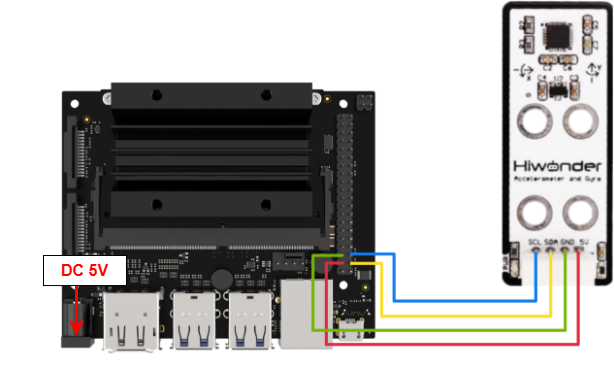
This section uses DuPont wires to connect acceleration modules. For wiring instructions, refer to the figure below:
Note
Before powering on, ensure that no metal objects are touching the controller. Otherwise, the exposed pins at the bottom of the board may cause a short circuit and damage the controller.
4.1.2 Environment Configuration
Install NoMachine on your computer. The software package is located under “2 Software Tools & Programs -> 01 Software Installation Package -> Remote Desktop Connection Tool -> 1 Remote Desktop Connection Tool”. For detailed usage of NoMachine, refer to the materials in the same directory.
Drag the program into the Jetson Nano system image, taking placing it on the desktop as an example.
4.2 Test Case
In this case, display the status detected by the acceleration sensor in the terminal window of the Jetson system.
4.2.1 Program Execution
Open the terminal and enter the following command to navigate to the program directory:
cd Desktop/
Run the program by entering:
python3 AccelateReadDemo.py
4.2.2 Project Outcome
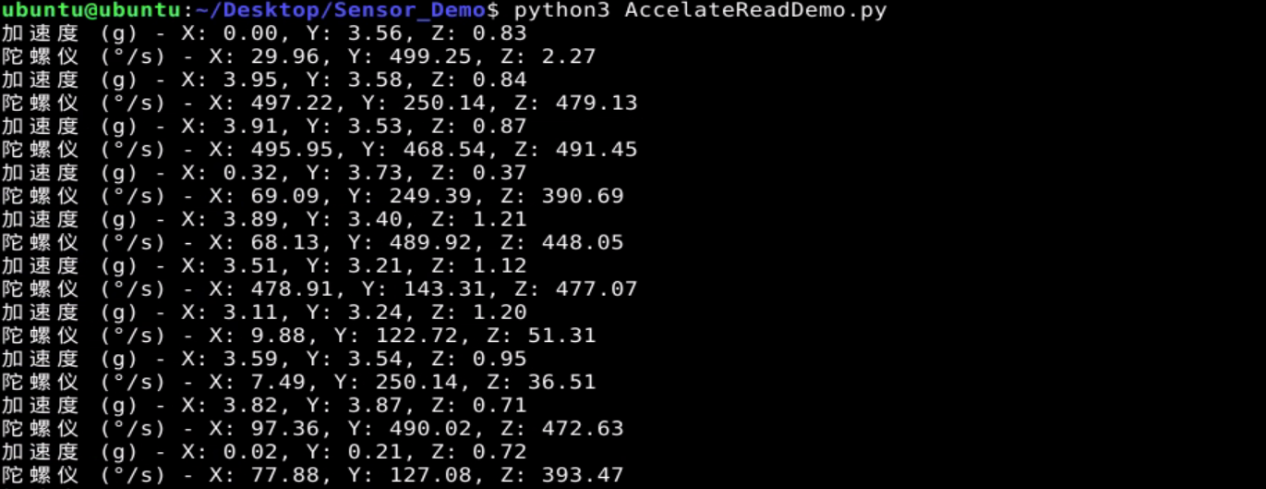
You can adjust its orientation to test the three-axis angular velocity and acceleration, which can be viewed in the terminal.
4.2.3 Program Brief Analysis
Import Libraries
import smbus2
import math
import time
Import the required libraries: smbus, math, and time. The smbus library is used for IIC communication, math provides functions for mathematical operations, and time supplies time-related functions.
Initialization Operation
# Set I2C bus number, usually 1 (设置I2C总线号,通常为1)
I2C_BUS = 1

# Set MPU6050 I2C address (设置MPU6050的I2C地址)
MPU6050_ADDR = 0x68

# Register addresses (寄存器地址)
MPU6050_ACCEL_XOUT_H = 0x3B
MPU6050_PWR_MGMT_1 = 0x6B

# Initialize I2C bus (初始化I2C总线)
bus = smbus2.SMBus(I2C_BUS)

# Enable MPU6050 (启用MPU6050)
bus.write_byte_data(MPU6050_ADDR, MPU6050_PWR_MGMT_1, 0)
After importing the libraries, set the IIC bus to 1 and the MPU6050 address to 0x68. Configure the registers to read the X-axis acceleration and control the sensor’s power mode and clock.
Then initialize the IIC bus through the smbus.SMBus(I2C_BUS) function to facilitate subsequent reading of sensor data.
Start the MPU6050 using bus.write_byte_data(MPU6050_ADDR, MPU6050_PWR_MGMT_1, 0).
Register Address Data Reading
def read_word(reg):
    high = bus.read_byte_data(MPU6050_ADDR, reg)
    low = bus.read_byte_data(MPU6050_ADDR, reg + 1)
    value = (high << 8) | low
    return value
Read the high 8 bits of a register using high = bus.read_byte_data(MPU6050_ADDR, reg), then read the low 8 bits using low = bus.read_byte_data(MPU6050_ADDR, reg).
Combine the two bytes and return the resulting value.
Sensor Data Reading
def read_sensor_data():
    accel_x = read_word(MPU6050_ACCEL_XOUT_H)
    accel_y = read_word(MPU6050_ACCEL_XOUT_H + 2)
    accel_z = read_word(MPU6050_ACCEL_XOUT_H + 4)
    gyro_x = read_word(MPU6050_ACCEL_XOUT_H + 8)
    gyro_y = read_word(MPU6050_ACCEL_XOUT_H + 10)
    gyro_z = read_word(MPU6050_ACCEL_XOUT_H + 12)

    return accel_x, accel_y, accel_z, gyro_x, gyro_y, gyro_z
Call the read_word function, use MPU6050_ACCEL_XOUT_H as the register address, and return the obtained value to accel_x, which corresponds to the data of the acceleration sensor x-axis.
The contents of accel_y, accel_z, gyro_x, gyro_y, and gyro_z are similar to accel_x, representing the data of the y-axis and z-axis of the acceleration sensor and the xyz-axis of the gyroscope sensor, respectively.
Main Function
def main():
    try:
        while True:
            accel_x, accel_y, accel_z, gyro_x, gyro_y, gyro_z = read_sensor_data()

            # Data processing and unit conversion according to the MPU6050 datasheet (根据MPU6050的数据手册,进行数据处理和单位转换)
            accel_x_scaled = accel_x / 16384.0
            accel_y_scaled = accel_y / 16384.0
            accel_z_scaled = accel_z / 16384.0
            gyro_x_scaled = gyro_x / 131.0
            gyro_y_scaled = gyro_y / 131.0
            gyro_z_scaled = gyro_z / 131.0

            # Filtering (滤波)
            print(f"加速度 (g) - X: {accel_x_scaled:.2f}, Y: {accel_y_scaled:.2f}, Z: {accel_z_scaled:.2f}")
            print(f"陀螺仪 (°/s) - X: {gyro_x_scaled:.2f}, Y: {gyro_y_scaled:.2f}, Z: {gyro_z_scaled:.2f}")

            time.sleep(0.1)  # Update data every second (每秒更新一次数据)

    except KeyboardInterrupt:
        pass
Call the read_sensor_data function to obtain the data of the sensor acceleration and gyroscope three axes, and assign them to six variables.
Divide the obtained data by the corresponding constant to reassign the values after converting units.
Print out the converted data and keep the last two decimal places.