5. Jetson Development
5.1 Getting Started
5.1.1 Wiring Instruction
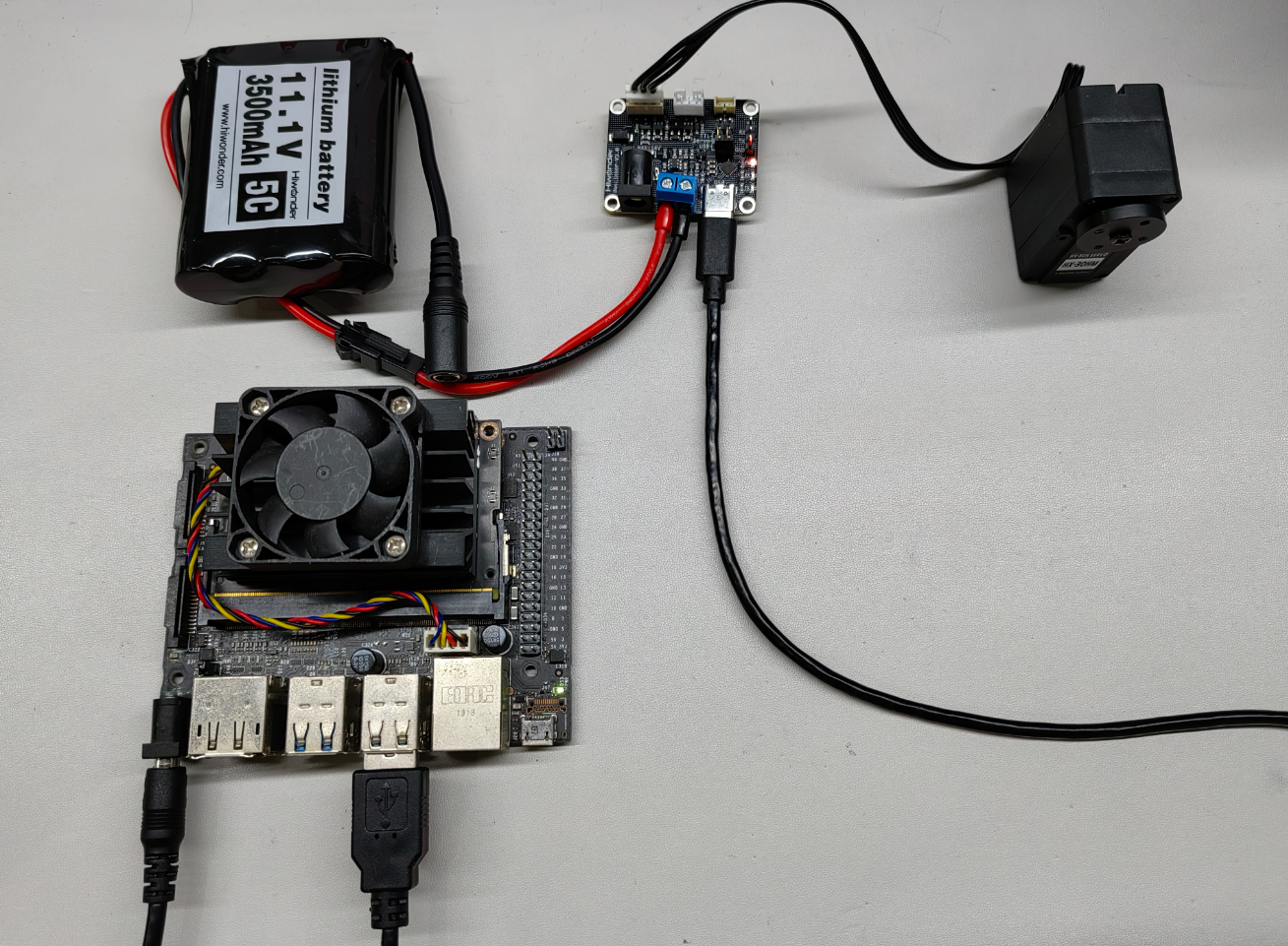
This example uses the Jetson Nano board powered by a 5V adapter. The bus servos are connected to the debugging board, which is powered by an 11.1V Li-ion battery. Finally, the debugging board is connected to any USB port of the Jetson Nano via a Type-C data cable.
Note
When using Hiwonder’s lithium battery, connect the battery cable with the red wire to the positive (+) terminal and the black wire to the negative (–) terminal of the DC port.
Before connecting the battery cables, make sure they are not already attached to the lithium battery. This prevents the risk of a short circuit caused by accidental contact between the positive and negative wires.
5.1.2 Environment Configuration
Install the NoMachine on PC. The installation files reside under 2. Softwares \ Remote Desktop Connection Tool. Consult the associated documentation in that directory for detailed NoMachine usage.
Drag the program and SDK library files into the Jetson Nano system image. In this example, they are placed in the Demo folder on the desktop.
Note
Make sure the library files are placed in the same directory as the program.
5.2. Development Example
Note
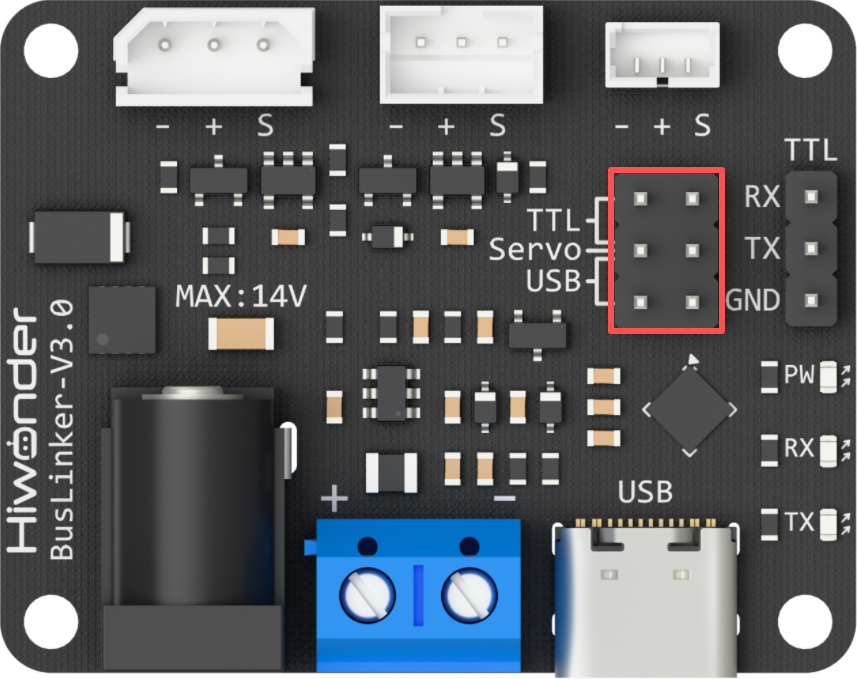
Before running this example, ensure that the jumpers on the debugging board are installed on the Servo and USB pins. Otherwise, communication will not function properly.
5.2.1 Reading the Servo Status
This example displays the bus servo’s own status through a terminal window.
5.2.1.1 Run Program
Open the terminal and enter the command to switch to the directory where the program is located:
cd Desktop/Demo/examples

Run the program by entering:
python3 ping.py

5.2.1.2 Program Outcome

Once the program is running, the terminal prints the servo status, which are the returned data frames.
5.2.1.3 Program Brief Analysis
Import the required libraries.
import sys
import os

sys.path.append("..")

from servo_sdk import *
Initialize the communication port and the servo object.
PortHandler = PortHandler('/dev/ttyACM0')
ServoHandler = HxServoHandler(PortHandler)
Create a serial port object, open it, and ensure the port is valid before setting the baud rate parameter.
if PortHandler.openPort():
    print("Succeeded to open the port")
else:
    print("Failed to open the port")
    quit()

if PortHandler.setBaudRate(1000000):
    print("Succeeded to change the baudrate")
else:
    print("Failed to change the baudrate")
    quit()
Read the operating status of servo ID 1 and print the returned response packet.
rxpacket, result, error = ServoHandler.ping(1)
if result != COMM_SUCCESS:
    print("%s" % ServoHandler.getTxRxResult(result))
else:
    print(f"rx: {' '.join(f'{byte:02X}' for byte in rxpacket)}")
if error != 0:
    print("%s" % ServoHandler.getRxPacketError(error))
5.2.2 Reading the Servo Position
This example displays the bus servo’s own position through the terminal window.
5.2.2.1 Run Program
Open the terminal and enter the command to switch to the directory where the program is located:
cd Desktop/Demo/examples
Run the program by entering:
python3 read_position.py

5.2.2.2 Program Outcome
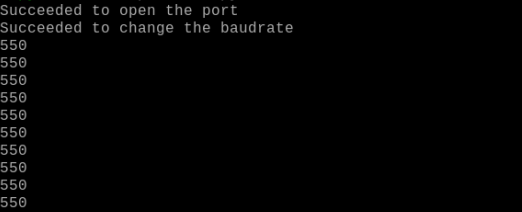
Once the program is running, the terminal screen scrolls with live updates of the servo’s current position readings.
5.2.2.3 Program Brief Analysis
Import the required libraries.
import sys
import os

sys.path.append("..")

from servo_sdk import *
Initialize the communication port and the servo object.
PortHandler = PortHandler('/dev/ttyACM0')
ServoHandler = HxServoHandler(PortHandler)
Create a serial port object, open it, and ensure the port is valid before setting the baud rate parameter.
if PortHandler.openPort():
    print("Succeeded to open the port")
else:
    print("Failed to open the port")
    quit()

if PortHandler.setBaudRate(1000000):
    print("Succeeded to change the baudrate")
else:
    print("Failed to change the baudrate")
    quit()
The
readLoadfunction continuously reads the current position of servo ID 1 and prints it, then closes the port.
while True:
    pos, result, error = ServoHandler.readLoad(1)
    if result != COMM_SUCCESS:
        print("%s" % ServoHandler.getTxRxResult(result))
        break

    if error != 0:
        print("%s" % ServoHandler.getRxPacketError(error))
        break

    print(pos)
    time.sleep(0.1)  # Delay for 0.1 seconds

PortHandler.closePort()
5.2.3 Servo Movement Control in Write Mode
5.2.3.1 Run Program
Open the terminal and enter the command to switch to the directory where the program is located:
cd Desktop/Demo/examples
Run the program by entering:
python3 write_position.py

5.2.3.2 Program Outcome
Once the program is running, servo ID 1 moves to position -3000 at a speed of 100 steps per second and an acceleration of 0 steps per second squared.
5.2.3.3 Program Brief Analysis
Import the required libraries.
import sys
import os

sys.path.append("..")

from servo_sdk import *
Initialize the communication port and the servo object.
PortHandler = PortHandler('/dev/ttyACM0')
ServoHandler = HxServoHandler(PortHandler)
Create a serial port object, open it, and ensure the port is valid before setting the baud rate parameter.
if PortHandler.openPort():
    print("Succeeded to open the port")
else:
    print("Failed to open the port")
    quit()

if PortHandler.setBaudRate(1000000):
    print("Succeeded to change the baudrate")
else:
    print("Failed to change the baudrate")
    quit()
Call the
writePosExfunction to set the servo position, and close the port when finished.
result, error = ServoHandler.writePosEx(1, -3000, 100, 0)

if result != COMM_SUCCESS:
    print("%s" % ServoHandler.getTxRxResult(result))
if error != 0:
    print("%s" % ServoHandler.getRxPacketError(error))


# Close port
PortHandler.closePort()
5.2.4 Servo Movement Control in RegWrite Mode
5.2.4.1 Run Program
Open the terminal and enter the command to switch to the directory where the program is located:
cd Desktop/Demo/examples
Run the program by entering:
python3 write_position.py

5.2.4.2 Program Outcome
Once the program is running, servo ID 1 moves back and forth between positions 20 and 1000 at a speed of 1500 steps per second and an acceleration of 0 steps per second squared, with an interval of approximately 0.75 seconds.
5.2.4.3 Program Brief Analysis
Import the required libraries.
import sys
import os

sys.path.append("..")

from servo_sdk import *
Initialize the communication port and the servo object.
PortHandler = PortHandler('/dev/ttyACM0')
ServoHandler = HxServoHandler(PortHandler)
Create a serial port object, open it, and ensure the port is valid before setting the baud rate parameter.
if PortHandler.openPort():
    print("Succeeded to open the port")
else:
    print("Failed to open the port")
    quit()

if PortHandler.setBaudRate(1000000):
    print("Succeeded to change the baudrate")
else:
    print("Failed to change the baudrate")
    quit()
Call
writeRegPosExfunction to set the servo position, employregActionto control whenwriteRegPosExexecutes, and finally shut down the port.
while True:
    result, error = ServoHandler.writeRegPosEx(1, 1000, 1500, 0)
    if result != COMM_SUCCESS:
        print("%s" % ServoHandler.getTxRxResult(result))
        break

    if error != 0:
        print("%s" % ServoHandler.getRxPacketError(error))
        break
    ServoHandler.regAction()
    time.sleep(((1000-20) / 1500) + 0.1)  #//[(P1-P0)/(V)] + 0.1

    # Servo (ID1~10) runs at a maximum speed ofV=1500*0.059=88.5rpm until it reaches position P0=20
    result, error = ServoHandler.writeRegPosEx(1, 20, 1500, 0)
    if result != COMM_SUCCESS:
        print("%s" % ServoHandler.getTxRxResult(result))
        break

    if error != 0:
        print("%s" % ServoHandler.getRxPacketError(error))
        break

    ServoHandler.regAction()
    time.sleep(((1000 - 20) / 1500) + 0.1)
    # time.sleep((1000-20)/(1500) + 0.1)) #//[(P1-P0)/(V)] + 0.1

# Close port
PortHandler.closePort()
5.2.5 Servo Movement Control in SyncWrite Mode
5.2.5.1 Run Program
Open the terminal and enter the command to switch to the directory where the program is located:
cd Desktop/Demo/examples
Run the program by entering:
python3 sync_write.py

5.2.5.2 Program Outcome
Once the program is running, servos ID 1 to 3 simultaneously move back and forth between positions 20 and 1000 at a speed of 1500 steps per second and an acceleration of 0 steps per second squared, with an interval of approximately 0.75 seconds.
5.2.5.3 Program Brief Analysis
Import the required libraries.
import sys
import os

sys.path.append("..")

from servo_sdk import *
Initialize the communication port and the servo object.
PortHandler = PortHandler('/dev/ttyACM0')
ServoHandler = HxServoHandler(PortHandler)
Create a serial port object, open it, and ensure the port is valid before setting the baud rate parameter.
if PortHandler.openPort():
    print("Succeeded to open the port")
else:
    print("Failed to open the port")
    quit()

if PortHandler.setBaudRate(1000000):
    print("Succeeded to change the baudrate")
else:
    print("Failed to change the baudrate")
    quit()
Call the
SyncWritePosExfunction to execute synchronized servo movements, and close the port upon completion.
while True:
    for id in range(1, 3):
        add_param_result = ServoHandler.syncWritePosEx(id, 1000, 1500, 0)
        if add_param_result != True:
            print("[ID:%03d] groupSyncWrite addparam failed" % id)

    # Syncwrite goal position
    result = ServoHandler.GroupSyncWrite.txPacket()
    if result != COMM_SUCCESS:
        print("%s" % result.getTxRxResult(result))
        break

    time.sleep(((1000-20) / 1500) + 0.1)  #//[(P1-P0)/(V)] + 0.1

    # Clear syncwrite parameter storage
    ServoHandler.GroupSyncWrite.clearParam()

    for id in range(1, 3):
        add_param_result = ServoHandler.syncWritePosEx(id, 20, 1500, 0)
        if add_param_result != True:
            print("[ID:%03d] groupSyncWrite addparam failed" % id)

    # Syncwrite goal position
    result = ServoHandler.GroupSyncWrite.txPacket()
    if result != COMM_SUCCESS:
        print("%s" % result.getTxRxResult(result))
        break

    time.sleep(((1000 - 20) / 1500) + 0.1)
    # time.sleep((1000-20)/(1500) + 0.1)) #//[(P1-P0)/(V)] + 0.1

    # Clear syncwrite parameter storage
    ServoHandler.GroupSyncWrite.clearParam()
# Close port
PortHandler.closePort()
5.2.6 Setting the Servo Operating Mode
5.2.6.1 Run Program
Open the terminal and enter the command to switch to the directory where the program is located:
cd Desktop/Demo/examples
Run the program by entering:
python3 select_mode.py

5.2.6.2 Program Outcome
Once the program is running, servo ID 1 is set to position servo mode.
5.2.6.3 Program Brief Analysis
Import the required libraries.
import sys
import os

sys.path.append("..")

from servo_sdk import *
Initialize the communication port and the servo object.
PortHandler = PortHandler('/dev/ttyACM0')
ServoHandler = HxServoHandler(PortHandler)
Create a serial port object, open it, and ensure the port is valid before setting the baud rate parameter.
if PortHandler.openPort():
    print("Succeeded to open the port")
else:
    print("Failed to open the port")
    quit()

if PortHandler.setBaudRate(1000000):
    print("Succeeded to change the baudrate")
else:
    print("Failed to change the baudrate")
    quit()
Call
selectModefunction to set the servo’s operating mode.
rxpacket, result, error = ServoHandler.selectMode(1, 0)

if result != COMM_SUCCESS:
    print("%s" % ServoHandler.getTxRxResult(result))
else:
    print(f"rx: {' '.join(f'{byte:02X}' for byte in rxpacket)}")
if error != 0:
    print("%s" % ServoHandler.getRxPacketError(error))