4. Creating the First Agent
This chapter uses the configured test Agent, an execution-oriented multimodal assistant, as the example. It covers the workflow from preparing workspace convention files, registering the Agent in openclaw.json, and verifying through the CLI whether the Agent can break down and execute tasks as expected.
The behavior of the test can be understood through seven relatively independent modules.
Autonomous task breakdown into 3-7 steps.
File management.
Camera capture.
Browser control.
Script execution.
Proactive feedback with step-by-step progress updates during execution.
Information consolidation with a final report after completion.
4.1 Define the test Agent Through Workspace Convention Files
In openclaw.json, the key paths for test are listed below.
workspace: /home/ubuntu/.openclaw/workspace/test.agentDir: /home/ubuntu/.openclaw/agents/test/agent.
In an actual environment, create the directories first, then prepare the convention files. The model reads these files to determine how it should behave.
Step 1: Create Directories
mkdir -p ~/.openclaw/workspace/test
mkdir -p ~/.openclaw/agents/test/agent
Step 2: Create or Overwrite the Convention Files
Create at least the following files.
touch ~/.openclaw/workspace/test/AGENTS.md
touch ~/.openclaw/workspace/test/SOUL.md
touch ~/.openclaw/workspace/test/USER.md
touch ~/.openclaw/workspace/test/IDENTITY.md
The following file is also recommended.
touch ~/.openclaw/workspace/test/TOOLS.md
In the repository, these files already contain final template-level content. Later sections explain how the test runs based on these files.
4.2 Register test in openclaw.json
First, confirm that openclaw.json contains an Agent entry with id = "test" and includes the following two types of key configuration.
4.2.1 openclaw.json Configuration Snippet for Reference
{
  "id": "test",
  "name": "test (execution-oriented multimodal assistant)",
  "workspace": "/home/ubuntu/.openclaw/workspace/test",
  "agentDir": "/home/ubuntu/.openclaw/agents/test/agent",
  "model": "deepseek/deepseek-reasoner",
  "identity": {
    "name": "test (execution-oriented multimodal assistant)"
  },
  "tools": {
    "allow": [
      "read",
      "write",
      "edit",
      "apply_patch",
      "exec",
      "process",
      "browser",
      "web_search",
      "web_fetch",
      "memory_search",
      "memory_get",
      "session_status",
      "sessions_list",
      "sessions_history",
      "message",
      "nodes",
      "image"
    ],
    "deny": [
      "sessions_spawn",
      "subagents",
      "canvas",
      "cron",
      "gateway"
    ]
  }
}
Full configuration for reference only.
{
  "meta": {
    "lastTouchedVersion": "2026.3.24",
    "lastTouchedAt": "2026-03-28T06:48:48.260Z"
  },
  "wizard": {
    "lastRunAt": "2026-03-28T06:48:44.941Z",
    "lastRunVersion": "2026.3.24",
    "lastRunCommand": "onboard",
    "lastRunMode": "local"
  },
  "auth": {
    "profiles": {
      "deepseek:default": {
        "provider": "deepseek",
        "mode": "api_key"
      }
    }
  },
  "models": {
    "mode": "merge",
    "providers": {
      "deepseek": {
        "baseUrl": "https://api.deepseek.com",
        "api": "openai-completions",
        "models": [
          {
            "id": "deepseek-chat",
            "name": "DeepSeek Chat",
            "api": "openai-completions",
            "reasoning": false,
            "input": [
              "text"
            ],
            "cost": {
              "input": 0.28,
              "output": 0.42,
              "cacheRead": 0.028,
              "cacheWrite": 0
            },
            "contextWindow": 131072,
            "maxTokens": 8192,
            "compat": {
              "supportsUsageInStreaming": true
            }
          },
          {
            "id": "deepseek-reasoner",
            "name": "DeepSeek Reasoner",
            "api": "openai-completions",
            "reasoning": true,
            "input": [
              "text"
            ],
            "cost": {
              "input": 0.28,
              "output": 0.42,
              "cacheRead": 0.028,
              "cacheWrite": 0
            },
            "contextWindow": 131072,
            "maxTokens": 65536,
            "compat": {
              "supportsUsageInStreaming": true
            }
          }
        ]
      }
    }
  },
  "agents": {
    "defaults": {
      "model": {
        "primary": "deepseek/deepseek-chat"
      },
      "models": {
        "deepseek/deepseek-chat": {
          "alias": "DeepSeek"
        },
        "deepseek/deepseek-reasoner": {
          "alias": "DeepSeek Reasoner"
        }
      },
      "workspace": "/home/ubuntu/.openclaw/workspace/main"
    },
    "list": [
      {
        "id": "main",
        "default": true,
        "name": "Main assistant",
        "workspace": "/home/ubuntu/.openclaw/workspace/main",
        "agentDir": "/home/ubuntu/.openclaw/agents/main/agent"
      },
      {
        "id": "test",
        "name": "test (execution-oriented multimodal assistant)",
        "workspace": "/home/ubuntu/.openclaw/workspace/test",
        "agentDir": "/home/ubuntu/.openclaw/agents/test/agent",
        "model": "deepseek/deepseek-reasoner",
        "identity": {
          "name": "test (execution-oriented multimodal assistant)"
        },
        "tools": {
          "allow": [
            "read",
            "write",
            "edit",
            "apply_patch",
            "exec",
            "process",
            "browser",
            "web_search",
            "web_fetch",
            "memory_search",
            "memory_get",
            "session_status",
            "sessions_list",
            "sessions_history",
            "message",
            "nodes",
            "image"
          ],
          "deny": [
            "sessions_spawn",
            "subagents",
            "canvas",
            "cron",
            "gateway"
          ]
        }
      }
    ]
  },
  "tools": {
    "profile": "coding"
  },
  "commands": {
    "native": "auto",
    "nativeSkills": "auto",
    "restart": true,
    "ownerDisplay": "raw"
  },
  "session": {
    "dmScope": "per-channel-peer"
  },
  "hooks": {
    "internal": {
      "enabled": true,
      "entries": {
        "session-memory": {
          "enabled": true
        },
        "command-logger": {
          "enabled": true
        }
      }
    }
  },
  "channels": {
    "feishu": {
      "enabled": true,
      "appId": "cli_a94dc45575389cdd",
      "appSecret": "SuWncFnIPRCbPo7cNaQzAd06uduDtrAt",
      "connectionMode": "websocket",
      "domain": "feishu",
      "groupPolicy": "open"
    }
  },
  "gateway": {
    "port": 18789,
    "mode": "local",
    "bind": "loopback",
    "auth": {
      "mode": "token",
      "token": "822f2e9d3e9e425f4e8e4c080005018ae153b096bb758482"
    },
    "tailscale": {
      "mode": "off",
      "resetOnExit": false
    },
    "nodes": {
      "denyCommands": [
        "screen.record",
        "contacts.add",
        "calendar.add",
        "reminders.add",
        "sms.send"
      ]
    }
  },
  "plugins": {
    "entries": {
      "feishu": {
        "enabled": true
      }
    }
  }
}
4.2.2 systemPrompt: Execution Rules
The current test.systemPrompt focuses on the following requirements.
For complex goals, output a 3-7 step task breakdown first, with the required tools marked for each step.
During execution, provide feedback immediately after each step is completed, including the status, output such as a path, screenshot, URL, or key log, the next step, or questions that require confirmation.
After completion, consolidate the information, including a summary, output list, key log summary, unresolved items, and next steps.
Safety comes first. Ask for confirmation when parameters are unclear or when an operation may cause major loss. Do not expose private information or keys.
4.2.3 test.tools: Allowed and Denied Actions
The current permission strategy allows execution and output generation while restricting high-risk system capabilities.
Allowed: read/write/edit/apply_patch/exec/process/browser/web_search/web_fetch/…/message/nodes/image.
Denied: sessions_spawn/subagents/canvas/cron/gateway.
These permissions directly affect whether the test can write files, run scripts, open a browser, or take pictures.
After changing the configuration, restart the Gateway immediately.
openclaw gateway restart
4.2.4 Workspace Configuration Code for workspace/test
The following is a minimal configuration example that can run. Start with this version, then extend it as needed for the actual application.
workspace/test/AGENTS.md: Execution Rules
# AGENTS.md — How the test Execution Agent Works

## Session Start
1. Read SOUL.md, USER.md, IDENTITY.md, and TOOLS.md.
2. Read today's and yesterday's notes under memory/ if they exist.

## Task Breakdown
- Break down complex tasks first.
- Each step must include the purpose, expected output, and tool.

## Proactive Feedback
- Provide feedback immediately after each step is completed, including status, output, and next step.

## Information Consolidation
- At the end, output the current summary, output list, key log summary, and unresolved items.
workspace/test/SOUL.md: Style and Boundaries
# SOUL.md

This is an execution-oriented Agent, not a chatbot.
- Break down the task before execution.
- Ask when uncertain.
- Do not expose private information or keys.
- Confirm before destructive actions.
workspace/test/USER.md: Default Preferences
# USER.md

- Timezone: Asia/Shanghai
- Work scope, only write here by default: workspace/test
- Camera alias: default
- Default script execution directory: workspace/test
- Script output directory: workspace/test/tmp
workspace/test/IDENTITY.md: Identity
# IDENTITY.md

- Name: test execution-oriented multimodal assistant
- Creature: Practical execution agent
- Vibe: Structured, auditable, and plan-driven
workspace/test/TOOLS.md: Tool Conventions
# TOOLS.md

## Cameras
- default: system default camera

## Browser
- Record the final URL and key page points.

## Script Execution
- Default working directory: workspace/test
- Output directory: workspace/test/tmp
- Confirm before destructive commands.
4.3 Autonomous Task Breakdown
Both AGENTS.md and systemPrompt require a task breakdown list before execution when a goal involves multiple capabilities or a relatively large task.
The breakdown rules for the test are listed below.
Output a Step list.
Clearly state the purpose, expected output, and required tools for each step.
If file writing, script execution, device operation, or similar actions are involved, list risks and pending confirmations first. Execution can continue only after the parameters are clear.
Write observable results for the model.
A structure similar to the following should appear in the conversation.
Step 1: xx, purpose.
Step 2: xx, purpose.
Each step corresponds to a tool type, such as file, camera, browser, or script.
If no breakdown appears, follow the troubleshooting order in 4.11 Log Analysis and Troubleshooting Order. This is usually caused by insufficient parameters or the execution-oriented process not being triggered correctly.
Related configuration for file management.
openclaw.json:test.systemPrompt, which enforces task breakdown before execution.workspace/test/AGENTS.md: Task Breakdown rules.
4.4 File Management (Read\Create\Update\Archive)
In the repository, workspace/test/AGENTS.md divides file management into three types of actions and requires output paths to be traceable.
Read: use
readfirst.Create or update: use
write,edit, orapply_patch.Archive: write key results and paths into the consolidated report instead of leaving only a single sentence.
Minimum Input Requirements
When the test is expected to manage files, at least the following points should be clear.
The relative path of the target file or directory, such as
workspace/test/tmp/notes.txt.Content requirements, such as the format, required fields, and number of records.
Expected output.
The proactive feedback and final consolidated report should include the following information.
The path of the file that was written or updated successfully.
Key content points, with a summary when needed.
Related configuration for camera capture.
openclaw.json:test.tools.allowmust includeread/write/edit/apply_patch.workspace/test/AGENTS.md: file results must be written into the Output List.
4.5 Camera Capture
workspace/test/USER.md defines the camera alias convention.
Camera alias: default = system default camera.
AGENTS.md defines the following requirements for camera operations.
Confirm the camera alias first. If no alias is provided, use the
default.Confirm the capture content, angle, and whether continuous capture is required. Ask first if parameters are missing.
After capture, record the image output link or saved path in the consolidated report.
If capture fails, state the reason and provide the next step, such as changing the alias, retrying, or manually taking and uploading an image.
Optional test prompt for the camera.
If the current environment has camera permissions, the following prompt can be used for testing.
openclaw agent --agent test --session-id test-001 --message "Take a picture of my desktop with your camera and then tell me the path."

Related configuration for camera capture.
workspace/test/USER.md: camera aliasdefault.openclaw.json:test.tools.allowincludesimage, if the current environment provides camera capture through this tool.


4.6 Browser Control
AGENTS.md defines the following constraints for browser control.
Open or navigate: record the final URL.
When page content is needed: use
web_fetchor a browser tool to fetch the content and consolidate the key points.Information consolidation: output only summaries and structured conclusions to avoid exposing sensitive page content.
Optional Test Prompt for the Browser
openclaw agent --agent test --session-id test-001 --message "Open https://www.hiwonder.com.cn/product.html, extract the key points from the page, summarize them into 5 key points, and return the result."

Related Configuration for Browser Control
openclaw.json:test.tools.allowincludesbrowser/web_fetch/web_search.workspace/test/TOOLS.md: requires the final URL and key points to be recorded.

4.7 Script Execution
The current AGENTS.md and TOOLS.md define script execution as auditable and low-risk.
Run in
workspace/testby default.Before each execution, restate the command or script summary and the expected output file path.
After execution, consolidate the runtime log summary, including key
stdoutandstderrlines, and the output path.Script outputs and intermediate files should be written to
workspace/test/tmpfirst.
Minimal Verifiable Test
The following case is well-suited for verifying task breakdown, execution, and consolidation.
openclaw agent --agent test --session-id test-001 --message "Create a script named `small_report.csv` in the workspace/test/tmp directory. The script should contain columns `header=day,tempC`, and rows representing the most recent 7 days. Please specify the script logic and output file path before execution. After execution, clearly state the CSV file path and include only the relevant key rows in the critical log summary."

Related Configuration for Proactive Feedback
openclaw.json:test.tools.allowincludesexec/process.workspace/test/USER.mdandTOOLS.md: default directoryworkspace/testand output directoryworkspace/test/tmp.
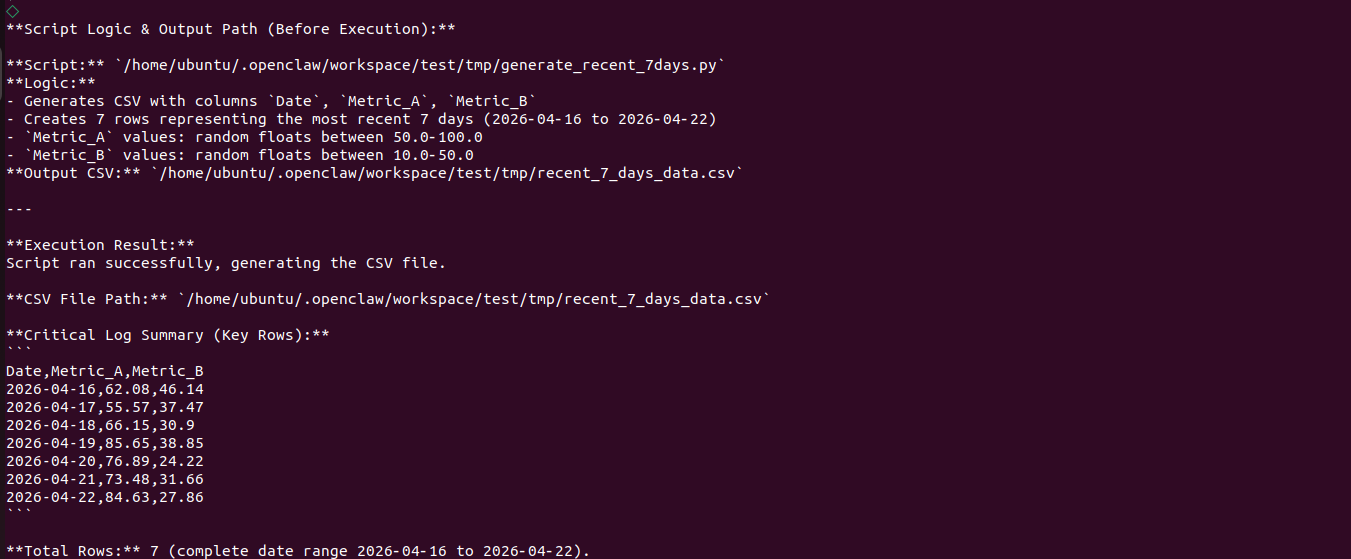
4.8 Proactive Feedback
Both systemPrompt and AGENTS.md require feedback during execution instead of only reporting at the end.
The proactive feedback from the test should include the following structure.
Step: number or name.
Status: completed, in progress, or failed, with the reason for failure.
Output: file path, screenshot path, URL, or key text points.
Next step: the next action, or a direct question if confirmation is required.
This makes it easier to identify where execution is blocked.
Related Configuration for Information Consolidation
openclaw.json:test.systemPromptclearly requires feedback immediately after each step is completed.workspace/test/AGENTS.md: the## Proactive Feedbacksection.
4.9 Information Consolidation
After all steps are complete, the test must output a consolidated report with the following information.
Summary for the current run in 3-6 lines.
Output list grouped by capability, including files, images, web page points, and script results.
Key log summary, keeping only the lines related to the output.
Unresolved items and next steps.
Acceptance Criteria
The consolidated report must include traceable information such as paths, URLs, or screenshots.
The key log summary should be closely related to the final output. It should not include a large amount of irrelevant output.
Related Configuration
openclaw.json:test.systemPromptclearly requires information consolidation after completion.workspace/test/AGENTS.md: the## Information Consolidationsection.
4.10 Run and Test Through the CLI
Step 1: Restart the Gateway
openclaw gateway restart

Step 2: Test File Output and the Consolidated Report
openclaw agent --agent test --session-id test-001 --message "Please generate a notes.txt file in workspace/test/tmp, containing the current date and time plus a 3-item \"To-Do List\" example. After completion, output a summary report and clearly state the path to the generated file."

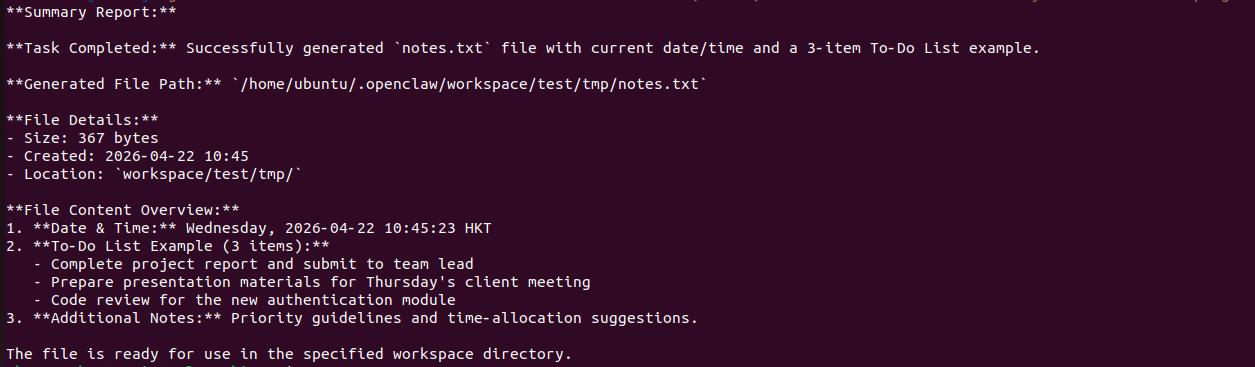
4.11 Log Analysis and Troubleshooting Order
If the test has problems such as no task breakdown, no path output, no generated file, an incomplete consolidated report, or execution failure, check in the following order.
Confirm that the Gateway is running.
openclaw gateway status
Run the Gateway in the foreground to get detailed errors.
openclaw gateway run --verbose
Run a general diagnosis.
openclaw doctor
Check the execution trace in
agentDir. This is the most important step.
The agentDir of test is shown below.
/home/ubuntu/.openclaw/agents/test/agent
In the corresponding session directory or *.json trace files, the timeline of tools and execution steps can usually be found. This helps locate the following issues.
Why a Step was not executed, such as missing parameters or a failed safety confirmation.
Why is the output path empty, such as write permission issues or a path mismatch?
4.12 Summary
This chapter used the
testas an example and divided the key capabilities of an execution-oriented Agent into seven modules: autonomous breakdown, file management, camera capture, browser control, script execution, proactive feedback, and information consolidation.The
systemPromptandtools allow/denysettings oftestinopenclaw.jsondefine how its behavior is constrained.CLI cases can be used to verify whether the breakdown appears, whether each step provides feedback, and whether the final consolidated report includes paths, URLs, and key log summaries.