5. Tool Debugging from Scratch
5.1 Minimum Closed Loop
The loop built in this chapter can be summarized as follows.
Note
Trigger phrases for Today’s briefing and city weather -> Agent selects a Skill -> Skill calls web_fetch or web_search step by step -> the response is assembled in a fixed format and returned.
The relationship can be reviewed based on Chapter 1. OpenClaw Overview and Chapter 2. OpenClaw Core Concepts.
Gateway: Routes messages to the test Agent.
Agent: Decides when to use a Skill and which tools are required.
Skill: Defines activation conditions, output format, execution steps, and constraints.
Tool: Fetches People’s Daily Online hot topics and weather information from the web.
5.2 Preparation
Step 1: Confirm That the Gateway Is Running
openclaw gateway status
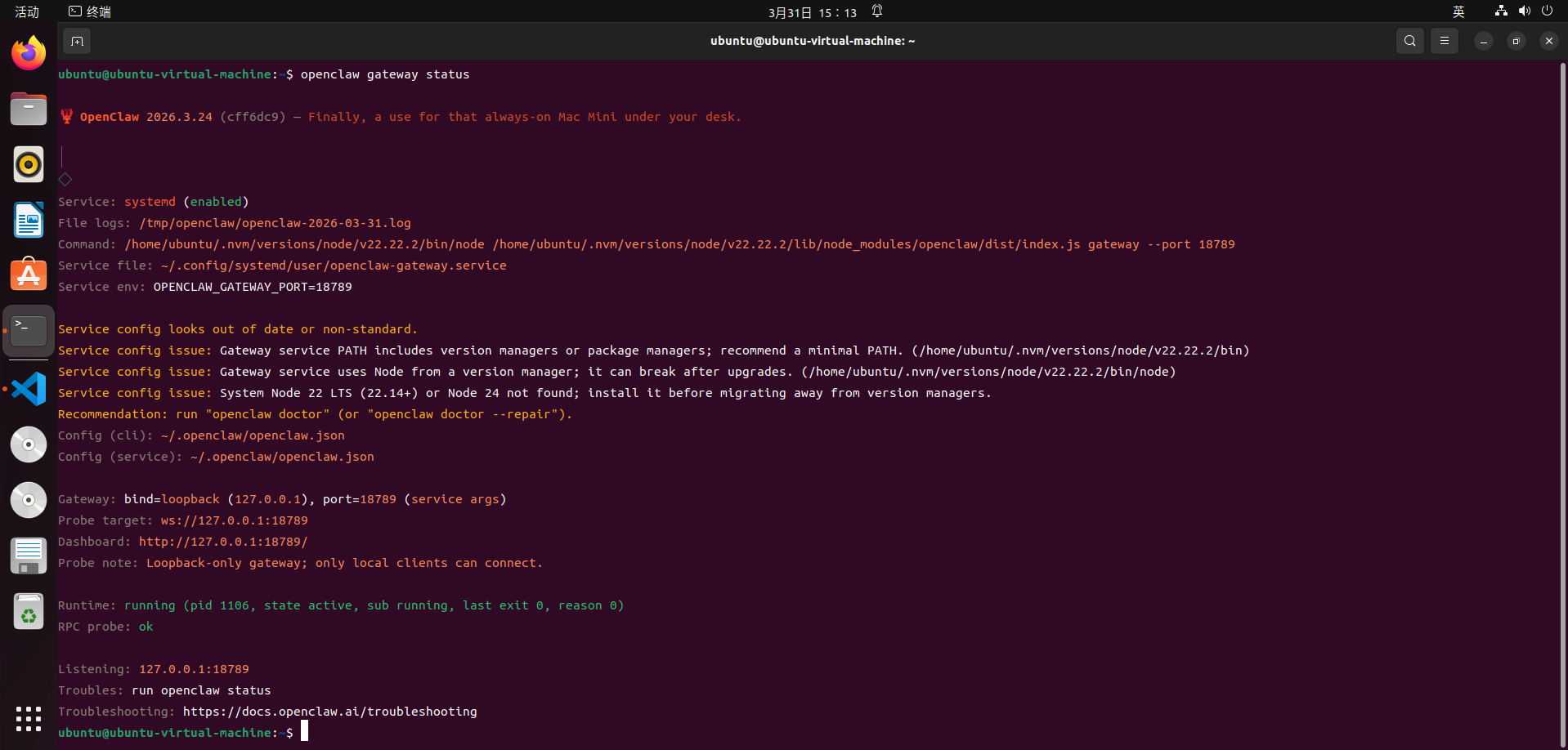
If the Gateway is not running, start it first.
openclaw gateway start

Step 2: Run a Quick Health Check for Configuration Validation
openclaw doctor

Step 3: Confirm that the
testAgent Exists
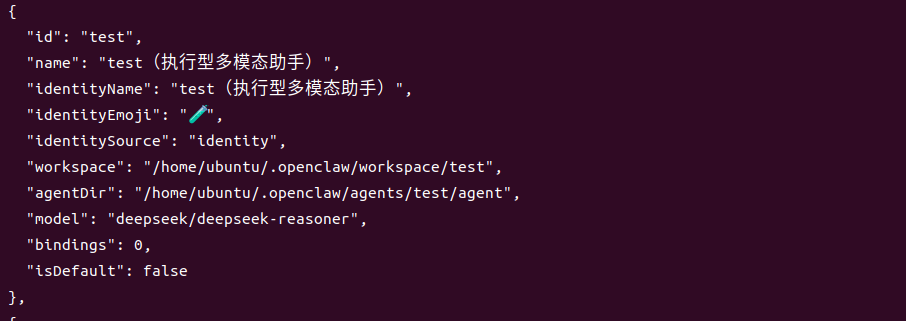
openclaw agents list --json

The output should include an entry similar to the following.
Note
This step is important. Later, the Skill configuration must be bound to an Agent. Without this id, joint debugging cannot continue.
5.3 Set Up the Workspace Conventions for the test Agent
Chapter 4 explains that the test is not a general chat agent. It performs execution-focused work according to predefined conventions.
When building from scratch, make sure the workspace of the test agent contains at least the following files.
AGENTS.md: Session startup flow, tool usage conventions, and final output collection format.SOUL.md,USER.md, andIDENTITY.md: Tone, preferences, identity display, and related settings.TOOLS.md: Optional local tool notes, such as camera aliases.
Use the actual path in openclaw.json. Find the entry with id: "test" under agents.list, then check the following fields.
workspaceagentDir
Create these files under workspace, or use the existing file content.
Note
If workspace/test/AGENTS.md and related files already exist in this repository, they can remain unchanged. This chapter focuses on the Skill -> tool call -> joint debugging flow.
5.4 Write the daily-briefing-weather Skill from Scratch
Step 1: Create the Skill Directory
Create the Skill directory under the workspace of the test.
mkdir -p ~/.openclaw/workspace/test/skills/daily-briefing-weather
Step 2: Create
SKILL.md
A Skill uses SKILL.md to tell the model the following information.
Activation conditions, including trigger phrases and request wording.
Output format, using a fixed template.
Execution steps, with weather first, hot topics next, and final assembly last.
Constraints, including no fabricated information when retrieval fails.
Write the following content. It can be used directly as a template.
---
name: daily-briefing-weather
description: >-
  Build a daily briefing when the request asks for Today's briefing, What's trending today, or Hot topic briefing. Answer city weather queries such as How is the weather in New York today? Fetch hot topics from People's Daily Online and weather from web sources, then output in this fixed format: Daily briefing: 1. Weather: {result}. Hot topics: {Title 1: brief summary, Title 2: brief summary...}.
version: "1.0.0"
---

# Daily Briefing and City Weather

## When to Activate

- The request says: `Today's briefing`, `What's trending today`, or `Hot topic briefing`.
- The request says: `How is the weather in <city> today?`, `Today's weather in <city>`, or `<city> weather`.

## Fixed Output Format

Always return one line or multiple lines with equivalent content. Keep the structure unchanged.

`Daily briefing: 1. Weather: {result}. Hot topics: {Title 1: brief summary, Title 2: brief summary...}`

Rules:
- The weather section should include key information for the day, such as weather conditions, temperature range, precipitation, wind, or comfort advice.
- Include at least 3 hot topics, usually 3 to 6. Each item should follow `Title: one-sentence summary`.
- If any item cannot be retrieved, clearly write `Not available yet`. Do not fabricate information.

## Execution Steps

1. Identify the intent
   - For `Today's briefing` or `What's trending today`, provide hot topics first by default and include the current session city weather when available.
   - For `How is the weather in <city> today?`, set `<city>` to the city mentioned in the request and include a hot topic summary.

2. Get weather
   - Prefer `web_fetch`: `https://wttr.in/<city>?lang=en` or `https://wttr.in/<city>?format=j1`.
   - If it fails, use `web_search` to search `<city> weather today`. Prioritize authoritative sources and extract same-day information.

3. Get hot topics from People's Daily Online
   - Use `web_fetch` to fetch `https://www.people.com.cn/`.
   - Select same-day hot topic headlines from homepage sections such as top news, breaking news, economy, technology, society, education, international news, or military news.
   - Write one brief summary for each headline based on visible page summaries. Do not speculate.

4. Assemble and respond
   - Follow the fixed output format strictly.
   - Use English by default. Keep the response concise and avoid unrelated greetings.

## Constraints

- Prioritize visible on-site information from People's Daily Online. Do not invent details.
- If the request asks only for weather, still return the fixed format and add hot topics.
- If the request asks only for hot topics, still return the fixed format and include weather. If no city can be determined, write `No city specified. Weather is not available yet`.
5.5 Register the Skill with test in openclaw.json
The string in the skills array of the Agent must match the name field in the header of SKILL.md.
Step 1: Edit
openclaw.json.
Find the entry with id: "test" under agents.list, then add the following field.
"skills": ["daily-briefing-weather"]
Complete configuration for reference only.
{
  "meta": {
    "lastTouchedVersion": "2026.3.24",
    "lastTouchedAt": "2026-03-31T03:53:19.728Z"
  },
  "wizard": {
    "lastRunAt": "2026-03-31T03:53:19.689Z",
    "lastRunVersion": "2026.3.24",
    "lastRunCommand": "doctor",
    "lastRunMode": "local"
  },
  "auth": {
    "profiles": {
      "deepseek:default": {
        "provider": "deepseek",
        "mode": "api_key"
      }
    }
  },
  "models": {
    "mode": "merge",
    "providers": {
      "deepseek": {
        "baseUrl": "https://api.deepseek.com",
        "api": "openai-completions",
        "models": [
          {
            "id": "deepseek-chat",
            "name": "DeepSeek Chat",
            "api": "openai-completions",
            "reasoning": false,
            "input": [
              "text"
            ],
            "cost": {
              "input": 0.28,
              "output": 0.42,
              "cacheRead": 0.028,
              "cacheWrite": 0
            },
            "contextWindow": 131072,
            "maxTokens": 8192,
            "compat": {
              "supportsUsageInStreaming": true
            }
          },
          {
            "id": "deepseek-reasoner",
            "name": "DeepSeek Reasoner",
            "api": "openai-completions",
            "reasoning": true,
            "input": [
              "text"
            ],
            "cost": {
              "input": 0.28,
              "output": 0.42,
              "cacheRead": 0.028,
              "cacheWrite": 0
            },
            "contextWindow": 131072,
            "maxTokens": 65536,
            "compat": {
              "supportsUsageInStreaming": true
            }
          }
        ]
      }
    }
  },
  "agents": {
    "defaults": {
      "model": {
        "primary": "deepseek/deepseek-chat"
      },
      "models": {
        "deepseek/deepseek-chat": {
          "alias": "DeepSeek"
        },
        "deepseek/deepseek-reasoner": {
          "alias": "DeepSeek Reasoner"
        }
      },
      "workspace": "/home/ubuntu/.openclaw/workspace/main"
    },
    "list": [
      {
        "id": "main",
        "default": true,
        "name": "Main Assistant",
        "workspace": "/home/ubuntu/.openclaw/workspace/main",
        "agentDir": "/home/ubuntu/.openclaw/agents/main/agent"
      },
      {
        "id": "test",
        "name": "test, execution-focused multimodal assistant",
        "workspace": "/home/ubuntu/.openclaw/workspace/test",
        "agentDir": "/home/ubuntu/.openclaw/agents/test/agent",
        "model": "deepseek/deepseek-reasoner",
        "skills": [
          "daily-briefing-weather"
        ],
        "identity": {
          "name": "test, execution-focused multimodal assistant"
        },
        "tools": {
          "allow": [
            "read",
            "write",
            "edit",
            "apply_patch",
            "exec",
            "process",
            "browser",
            "web_search",
            "web_fetch",
            "memory_search",
            "memory_get",
            "session_status",
            "sessions_list",
            "sessions_history",
            "message",
            "nodes",
            "image"
          ],
          "deny": [
            "sessions_spawn",
            "subagents",
            "canvas",
            "cron",
            "gateway"
          ]
        }
      }
    ]
  },
  "tools": {
    "profile": "coding"
  },
  "commands": {
    "native": "auto",
    "nativeSkills": "auto",
    "restart": true,
    "ownerDisplay": "raw"
  },
  "session": {
    "dmScope": "per-channel-peer"
  },
  "hooks": {
    "internal": {
      "enabled": true,
      "entries": {
        "session-memory": {
          "enabled": true
        },
        "command-logger": {
          "enabled": true
        }
      }
    }
  },
  "channels": {
    "feishu": {
      "enabled": true,
      "appId": "cli_a94dc45575389cdd",
      "appSecret": "SuWncFnIPRCbPo7cNaQzAd06uduDtrAt",
      "connectionMode": "websocket",
      "domain": "feishu",
      "groupPolicy": "open"
    }
  },
  "gateway": {
    "port": 18789,
    "mode": "local",
    "bind": "loopback",
    "auth": {
      "mode": "token",
      "token": "822f2e9d3e9e425f4e8e4c080005018ae153b096bb758482"
    },
    "tailscale": {
      "mode": "off",
      "resetOnExit": false
    },
    "nodes": {
      "denyCommands": [
        "screen.record",
        "contacts.add",
        "calendar.add",
        "reminders.add",
        "sms.send"
      ]
    }
  },
  "plugins": {
    "entries": {
      "feishu": {
        "enabled": true
      }
    }
  }
}
Step 2: Make sure the required tool permissions are allowed.
In the same test agent entry, check that tools.allow contains at least the following tools.
web_fetchweb_search
        "tools": {
          "allow": [
            "read",
            "exec",
            "process",
            "web_search",
            "web_fetch",
            "memory_search",
            "memory_get",
            "session_status",
            "sessions_list",
            "sessions_history",
            "message"
          ],
Note
Without web_fetch and web_search, even a well-written Skill may only generate a description instead of fetching facts.
Step 3: Optional but strongly recommended, name the trigger in
systemPrompt.
To make Skill selection more stable, add the following hard rule to the systemPrompt of test.
When the request mentions
Today's briefing,What's trending today, orHow is the weather in <city> today?, use thedaily-briefing-weatherSkill first.
If a similar configuration already exists in this repository, this step mainly explains why the Skill can be triggered when building from scratch.
5.6 Restart the Gateway and Run Joint Debugging
Step 1: Restart the Gateway.
openclaw gateway restart
Step 2: Run a Skill self-check to confirm availability and discoverability.
openclaw skills list -v
openclaw skills check --json
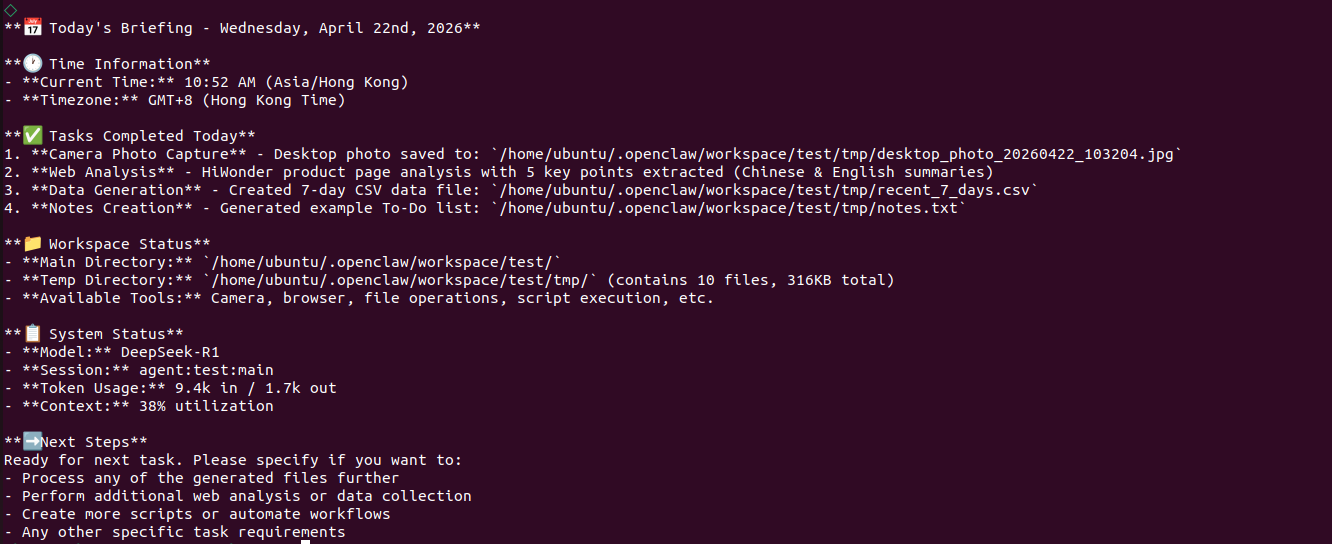
Step 3: Trigger both debugging cases with fixed phrases.
Hot topic briefing:
openclaw agent --agent test --session-id test-002 --message "Today's briefing."

5.7 Troubleshooting Guide
Skill Is Not Triggered
Check whetherdescriptioncontains the actual trigger phrases in use and whethertest.systemPromptnames this Skill.Skill Is Triggered, but No Fetching Happens
Check whethertest.tools.allowallowsweb_fetchandweb_search.Restart Does Not Take Effect
After modifyingopenclaw.json,openclaw gateway restartmust be run.Fetching Fails but Fabrication Must Be Avoided
The Skill requiresNot available yetwhen retrieval fails. If fabricated content appears, review the execution steps and constraints.